Tutorial: your first SUCC character
By the end of this page you will have a character that walks, jumps, crouches and bunnyhops around a test level, and you will have compared Quake movement against Half-Life 2 movement with a single key press.
Follow it in order. Later pages explain what each value means.
You need Godot 4.6 or newer.
Step 1: get the addon into your project
Copy the addons/SUCC/ folder into your own project's addons/ folder.
That's the whole install. SUCC's scripts declare a class_name, so Godot registers
them when it scans the folder. There is no plugin to enable in Project Settings.
Step 2: add the movement keys
SUCC reads named actions rather than raw keys, so you decide the bindings. Open Project → Project Settings → Input Map and add these seven actions:
| Action name | Key |
|---|---|
forward |
W |
back |
S |
left |
A |
right |
D |
jump |
Space |
crouch |
Ctrl |
sprint |
Shift |
Type the name exactly as written, press Add, then click the + beside it to bind the key.
If you skip one, SUCC won't crash. It prints a warning naming the missing action and
disables just that movement, so you can start with forward and add the rest later.
Step 3: put a character in your scene
Open any 3D scene with a floor in it. Drag addons/SUCC/scenes/succ_character.tscn
from the FileSystem panel into the scene tree.
Press F6 to run the current scene. You can now walk with WASD, look with the mouse, jump with Space and crouch with Ctrl. Press Esc to release the mouse.
That's a working character. The rest of this page covers what you have.
Step 4: run the demo gym
SUCC ships with a test level that exercises every movement feature. Open
addons/SUCC/demo/test_level.tscn and press F6.
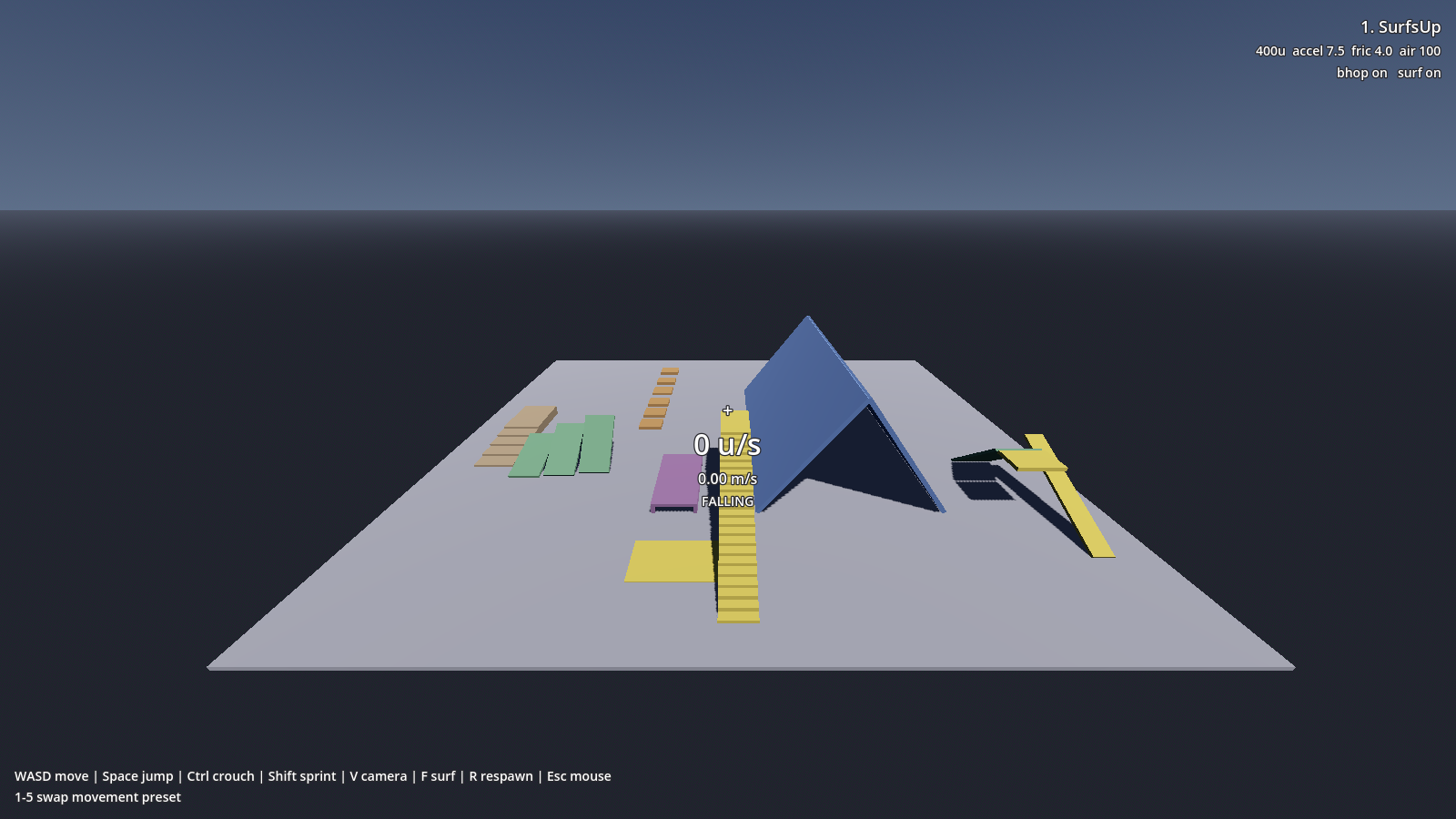
You spawn on the yellow pad. Six lanes run away from you, each testing a different thing:
- Stairs (far left, tan), walk and sprint up and down. The camera and model should trace a smooth grade rather than snapping to each tread.
- Slants (green), three walkable ramps at 15°, 30° and 44°.
- Bunnyhop blocks (orange, centre), hold Space while running. Holding is enough; you don't need to tap it.
- Crouch corridor (purple), walk in standing and you stop. Hold Ctrl and you fit.
- Surf ramp (blue), the steep peak. Climb the yellow ramp, drop onto a sloped face, and hold a strafe key into the slope.
- Slide (far right), a 40° chute you slide down.
The number under the crosshair is your speed, shown twice: engine units per second on top, metres per second below. Source players think in units; Godot thinks in metres.
The demo gym covers what each lane tests and why it's sized the way it is.
Step 5: switch engines
While the demo is running, press the number keys 1 to 5. The label in the top-right corner changes each time.
Walk the same stretch of floor after each press:
- SurfsUp, the fastest, 400 units per second.
- GoldSrc, Half-Life. 320 u/s.
- Quake, also 320 u/s, but a shorter character with a lower camera.
- Quake 2, noticeably grippier when you stop, and you cannot gain speed by strafing in the air.
- Source, Half-Life 2. Floaty jumps and slow on foot at 190 u/s, until you hold Shift to sprint and it jumps to 320.
Try the bunnyhop blocks on preset 5, then on preset 1. On Source you will fall short on the later gaps; its jump is roughly a third as high.
That swapped five complete movement models without touching code. Each is a .tres
resource file, which is the main idea behind SUCC.
What you built
- A character that walks, jumps, crouches and sprints.
- Movement feel living in a config resource, not in the controller's code.
- A test level for checking any change you make later.
Where to go next
- To ship one of those five presets in your game: Use a movement preset.
- To add health, weapons or anything game-specific: Extend SUCC for your game.
- To build your own: Tune your own movement.
- To understand why holding jump makes you faster: How the movement works.